




👉 🚀 View Official Landing Page 👈
A modern Python application for tracking daily habits and maintaining streaks, featuring both CLI and GUI interfaces.
- What's New
- ⚡ Quick Start
- Features
- 📸 Screenshots
- 📁 Project Structure
- 🖥️ Command Line Usage For Developers
- 📝 Notes
- 🔒 Development Workflow
- 💾 Data Storage
- 🎨 Themes
- 📄 License
v2.1.1 → v2.2.0
- Added modern GUI interface with customtkinter
- Dark/Light/System theme support
- Interactive habit setup wizard
- Enhanced visualization and statistics
- Real-time streak tracking
- Updated storage location to user configuration directory for executables and clarified source code data path
- Added in-app daily reminders and notifications
- Autosave functionality
- Visualization/Chart customization for better user experience
💡 Note: This app is written in pure Python and the source code is cross-platform (Windows, macOS, Linux).
✅ Pre-built binaries are available for Windows, macOS & Linux
- Download
heraldexx-habit-tracker-v2.2.0-windows.exefrom Release v2.2.0 - Double-click to run
- Follow the interactive setup wizard
⚠️ Data is stored inC:\Users\<username>\.heraldexx-habit-tracker\data. Ensure this directory is preserved for your logs, streaks, and visualizations.
- Download
heraldexx-habit-tracker-v2.2.0-linuxfrom Release v2.2.0 - Open terminal in download location
- Run:
chmod +x heraldexx-habit-tracker-v2.2.0-linux - Run:
./heraldexx-habit-tracker-v2.2.0-linux - Follow the interactive setup wizard
⚠️ Data is stored in~/.heraldexx-habit-tracker/data. Ensure this directory is preserved for your logs, streaks, and visualizations.
- Download
heraldexx-habit-tracker-v2.2.0-macosfrom Release v2.2.0 - Open terminal in download location
- Run:
chmod +x heraldexx-habit-tracker-v2.2.0-macos - Run:
./heraldexx-habit-tracker-v2.2.0-macos - Follow the interactive setup wizard
⚠️ Data is stored in~/.heraldexx-habit-tracker/data. Ensure this directory is preserved for your logs, streaks, and visualizations.
- Download the Cross-Platform Source Code (zip) from Releases Page (do not download the executables)
- Extract the zip file
- Navigate to and open your terminal in the extracted folder
- Install dependencies:
pip install -r requirements.txt-
Run the program:
- Start in GUI mode (default):
python main.py
- Start in CLI mode:
python main.py --cli
⚠️ Data is stored in thedata/directory relative tomain.py. Ensure this directory is preserved for your logs, streaks, and visualizations.
- Modern, customizable interface
- Dark/Light/System theme support
- Interactive habit setup wizard
- Real-time habit tracking
- Visual streak indicators
- Detailed log history view
- Interactive statistics and visualizations
- One-click theme switching
- Intuitive navigation
- Autosave functionality
- In-app daily reminders and notifications
- Visualization/Chart customization
- Track 2-10 daily habits
- Maintain streak counts
- View habit completion logs
- Clear logs or reset data
- Command-line arguments support
- Cross-platform compatibility
- JSON-based persistent storage
- Visualization plot generation
- View MIT license
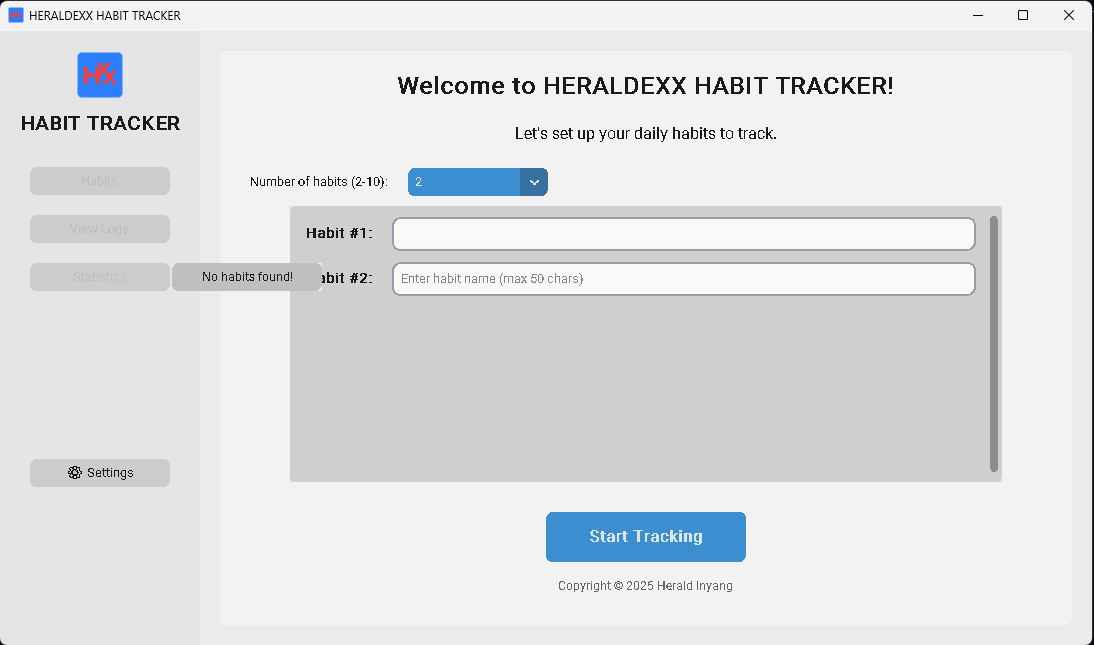
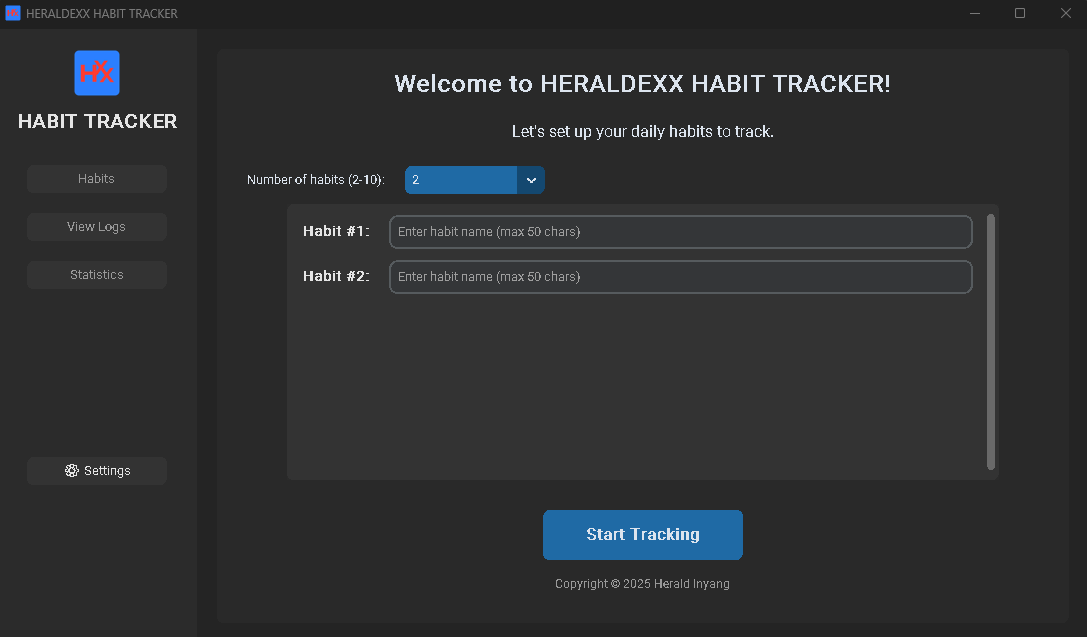
Light and Dark Theme Interfaces
(click images to enlarge)
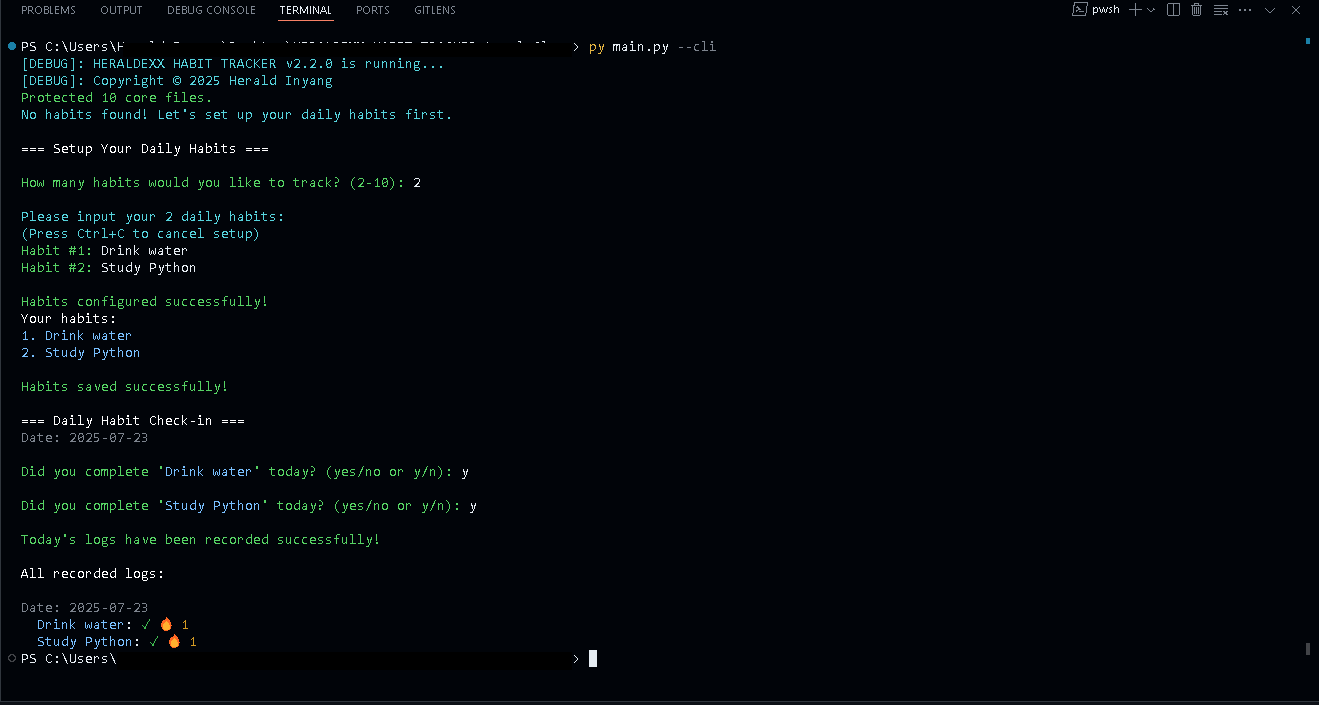
Command-Line Interface (CLI) Mode
(click images to enlarge)
├── main.py                     # Main entry point with both GUI and CLI modes
├── requirements.txt            # Python package dependencies
├── README.md                   # Project documentation
├── .github/                    # GitHub specific configurations
│   └── workflows/             # GitHub Actions CI/CD workflows
│       └── build.yml          # Cross-platform build configuration
├── assets/                    # Application assets
│   ├── icon.ico              # Windows application icon
│   ├── icon.png              # Main application icon (for macOS/Linux)
│   └── icons/                # Icon variants for different resolutions
│       ├── icon_16.png       # 16x16 icon
│       ├── icon_32.png       # 32x32 icon
│       ├── icon_64.png       # 64x64 icon
│       ├── icon_128.png      # 128x128 icon
│       └── icon_256.png      # 256x256 icon
├── data/                      # Data storage directory
│   ├── settings.json         # User-specific settings and preferences
│   ├── habits.json           # User's configured habits
│   ├── logs.json            # Daily habit completion records
│   ├── streaks.json        # Current streak counts for each habit
│   └── plots/              # Generated visualization plots
└── habit_engine/             # Core application package
    ├── __init__.py          # Package metadata and version info
    ├── gui.py               # Modern GUI interface using customtkinter
    ├── habit_setup.py       # Initial habit configuration logic
    ├── habit_io.py          # File I/O and data persistence
    ├── habit_logic.py       # Core habit tracking algorithms
    ├── habit_display.py     # CLI display and output formatting
    └── habit_visualization.py # Data visualization and plotting
The source code can run in either GUI or CLI mode.
View all available commands and usage information:
python main.py -hor
python main.py --helpStart in GUI mode (default):
python main.pyForce CLI mode:
python main.py --cliView help message:
python main.py -hor
python main.py --helpShow app info and version:
python main.py -ior
python main.py --infoView MIT license:
python main.py -lor
python main.py --licenseView habit completion logs and streaks:
python main.py -v-logsor
python main.py --view-logsClear tracking data while keeping habits:
python main.py -c-logsor
python main.py --clear-logsReset everything (habits, logs, streaks, and plots):
python main.py -ror
python main.py --resetCreate habit streak visualizations:
python main.py -por
python main.py --plotDeveloper mode (make core files editable):
python main.py --devLock core files (after development):
python main.py --lock
- For executables, data is stored in
~/.heraldexx-habit-tracker/data(Linux/macOS) orC:\Users\<username>\.heraldexx-habit-tracker\data(Windows).- For source code, data is stored in
data/relative tomain.py.- Visualizations are saved in the
plots/subdirectory of the data directory.- Use GUI mode for the best interactive experience
- CLI mode is ideal for automation and scripting
📝 Note: For Linux and macOS users, you may need to make the file executable first (as already stated in the platform-specific instructions above):
For Linux:
chmod +x heraldexx-habit-tracker-v2.2.0-linux
For macOS:
chmod +x heraldexx-habit-tracker-v2.2.0-macos
When making changes to the codebase:
- Unlock files for development:
python main.py --dev-
Make your changes to the code
-
Lock files before committing:
python main.py --lock- Push your changes:
git add .
git commit -m "Your commit message"
git push
This ensures that files are always pushed in their protected (read-only) state.
All data is stored in JSON format in the data directory:
- For executables:
~/.heraldexx-habit-tracker/data(Linux/macOS) orC:\Users\<username>\.heraldexx-habit-tracker\data(Windows)- For source code:
data/directory relative tomain.pyThe data directory contains:
settings.json: User-specific settings and preferenceshabits.json: List of configured habitslogs.json: List of daily habit completion logsstreaks.json: Dictionary of current streaks for each habitplots/: Folder containing auto-generated visualization plots
The application supports three theme modes:
- Light Mode: Optimized for bright environments
- Dark Mode: Easy on the eyes in low-light conditions
- System Mode: Automatically matches your system preferences
Switch between themes using the dropdown menu in the sidebar.
This project is licensed under the MIT License. You can view the license text:
- In GUI mode: Click 'View License' button in the Statistics view
- In CLI mode: Use the
-lor--licenseoption- Or read the LICENSE file in the source code project root
MIT Licensed • © 2025 Herald Inyang •

