A complete workflow for generating stylised, game-ready terrain maps from real-world data using QGIS and Python.
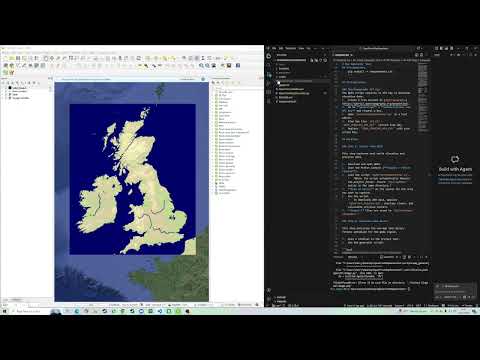
- DEM Download: Connects to OpenTopography API to fetch high-resolution Global Digital Elevation Models (Copernicus GLO-90) for any user-defined extent.
- Smart Mosaicing: Automatically handles large areas by downloading multiple tiles and merging them seamlessly.
- Hydrology Overlay: Integrates Natural Earth river and lake data to ensure accurate water features.
- Province Generation: Identifies major administrative boundaries (provinces/states) within the map area and calculates their visual centers for game logic.
- Custom Palette: Applies a specific color ramp (
OpenFront_Palette.qml) that maps elevation values to game-compatible terrain colors (e.g., deep water, coastal plains, highlands, mountains). - Dynamic Height Scaling: Automatically adjusts the elevation color ramp based on the local maximum height of the selected area. This ensures that relatively flat regions (like the Netherlands or Florida) still exhibit rich topographical detail by stretching the full color palette across the available elevation range, rather than appearing uniformly flat.
- Water Processing: Distinguishes between oceans, lakes, and rivers using specific color codes (Blue channel values) for the game engine to interpret.
- Binary Map Conversion: Converts the visual PNG map into optimized binary files (
.bin) containing packed terrain data (type, magnitude, shorelines). - Multi-Scale LODs: Automatically generates Level of Detail (LOD) maps:
- 1:1 Scale: Full resolution for detailed gameplay.
- 1:2 & 1:4 Scales: Downsampled versions for minimaps and strategic views.
- Cleanup Algorithms: Includes algorithms to remove noise, such as tiny islands (< 30 pixels) and small lakes (< 200 pixels), ensuring a clean playable area.
- Manifest Creation: Compiles all map metadata, including province coordinates, spawn points, and map dimensions, into a JSON manifest.
- Flag Assignment: Automatically matches province/nation names from the source data to a library of SVG flags, assigning them to the generated nations.
.
├── OpenFrontMapGenerator.py    # QGIS Python script for data extraction
├── OpenFront_Palette.qml       # QGIS styling palette
├── scripts/
│   └── map_generator.py        # Python script for processing assets
├── StylisedMaps/               # Input folder for QGIS exports
├── generated/                  # Output folder for game assets
└── requirements.txt            # Python dependencies
- QGIS (v3.40 or compatible).
- Python 3.x installed.
- Install required Python packages:
pip install -r requirements.txt
The QGIS script requires an API key to download elevation data.
- Create a free account at OpenTopography.
- Go to myOpenTopo > Authorizations and API Key and request a key.
- Open
OpenFrontMapGenerator.pyin a text editor. - Find the line
API_KEY = "YOUR_OPENTOPO_API_KEY"(around line 40). - Replace
"YOUR_OPENTOPO_API_KEY"with your actual key.
This step captures real-world elevation and province data.
- Download and open QGIS.
- Open the Python Console (Plugins > Python Console).
- Load the script
OpenFrontMapGenerator.py.- Note: The script automatically detects the project folder. Ensure
StylisedMapsexists in the same directory.
- Note: The script automatically detects the project folder. Ensure
- Draw an Extent on the canvas for the area you want to capture.
- Run the script.
- It downloads DEM data, applies
OpenFront_Palette.qml, overlays rivers, and calculates province centers.
- It downloads DEM data, applies
- Output: Files are saved to
StylisedMaps/<MapName>/.
This step processes the raw map into binary formats optimized for the game engine.
- Open a terminal in the project root.
- Run the generator script:
python scripts/map_generator.py "MapName"Replace "MapName" with the name of the folder inside StylisedMaps (e.g., "United Kingdom").
Optional Arguments:
--input: Custom input directory (default:StylisedMaps).--output: Custom output directory (default:generated/maps).--test: Skip removal of small islands/lakes (faster for debugging).
The tool generates two versions of the map in generated/maps/.
Note: Output folder names are automatically converted to lowercase with no spaces (e.g., "United Kingdom" -> "unitedkingdom").
<mapname>: Full resolution (1:1 scale with QGIS export).<mapname>small: Half resolution (1:2 scale).
Output Files:
map.bin: Main binary terrain data.map4x.bin: 1/2 scale binary data.map16x.bin: 1/4 scale binary data.thumbnail.png: Preview image.manifest.json: Metadata with scaled coordinates for nations/provinces.
- "ModuleNotFoundError": Run
pip install -r requirements.txt. - QGIS Path Errors: Ensure you are running the script from a saved file, or manually update the
PROJECT_ROOTvariable in the Python script if running directly from the console buffer.