This project is for my Cloud Computing final at the University of San Francisco.
This project is a full-fledged AI Single Page Application (SPA) built with serverless architecture and cloud infrastructure.
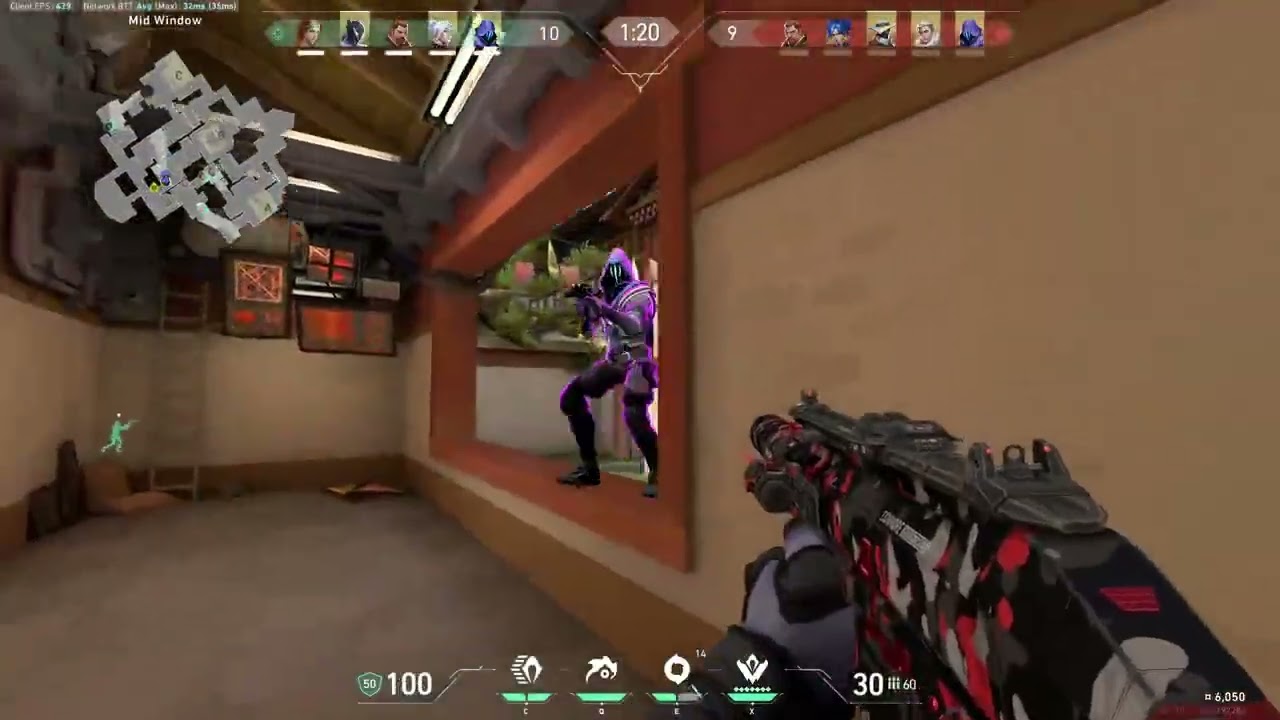
AI-powered Valorant montage maker using AWS services. Takes up to ~4 min gameplay clips, detects kills using Rekognition, and generates an edited montage with AI commentary.
- Static Page: Served via cloud storage (S3) as the frontend SPA.
- API Backend: AWS API Gateway routing to Lambda functions to process REST endpoints (no GraphQL used).
- Authentication: Implemented with Amazon Cognito, supporting username/password login plus one OAuth provider.
- Database: Cloud-hosted RDBMS for persistent storage (no DynamoDB).
- DNS & CDN: Custom domain with Cloudflare for DNS, CDN caching, and SSL; HTTPS enforced.
- Security: Protection against DDoS attacks and ReCaptcha integration via Cloudflare.
- AI Integration: Connects to an external ML API (approved for use in this project).
- Service Constraints: No AWS Amplify, Google Firebase, or other automatic SaaS/PaaS deployment tools.
- The following variables are required for local dev. Please view
next-app/app/auth/auth.config.tsfor formatting:
NEXT_PUBLIC_COGNITO_CLIENT_ID=
NEXT_PUBLIC_COGNITO_ENDPOINT=
NEXT_PUBLIC_COGNITO_DOMAIN=
NEXT_PUBLIC_COGNITO_REDIRECT_URI=- Addtionally, confirm/update any
CORSpolicies ininfra/aws/api_gateway.tf
Cognito utilizes Google OAUTH 2.0 for the additional sign-in requirement.
- Create a Google Cloud Platform account (if you don’t have one).
- Go to APIs & Services → Credentials.
- Click Create Credentials → OAuth client ID and choose Web application.
- Configure the Authorised JavaScript origins:
https://<your-cognito-domain>.auth.<region>.amazoncognito.com
- Configure the Authorized redirect URIs:
https://<your-cognito-domain>.auth.<region>.amazoncognito.com/oauth2/idpresponse
NOTE: The main uri for the two previous steps can be found in the
cognito_pool_domainoutput of Terraform.
-
Note down the generated
Client IDandClient Secret. -
In this repository, navigate to
infra/awsand create aterraform.tfvarsfile containing:
google_auth_client_id     = "YOUR CLIENT ID"
google_auth_client_secret = "YOUR CLIENT SECRET"
Once done, Google sign-in will be enabled in the Cognito UI.
- Run
aws secretsmanager delete-secret --secret-id app-config --force-delete-without-recoverybetweenterraform destroyandterraform applybecause AWS doesn't want you accidentally deleting your secrets (although in this case it's intentional).
- AWS Account with appropriate IAM permissions
- Terraform installed locally
- AWS CLI configured with credentials
- Docker for building Lambda layers
- Rekognition Custom Labels model trained on kill detection
-
Build Lambda Layers:
cd scripts/
./ffmpeg_zip_create.sh    # Creates ffmpeg-layer.zip on ~/Desktop
./psycopg_zip_create.sh   # Creates psycopg-layer.zip on ~/Desktop
Upload these layers to AWS Lambda manually or via Terraform.
-
Configure Terraform Variables: Create
infra/aws/terraform.tfvars:google_auth_client_id = "your-google-client-id" google_auth_client_secret = "your-google-client-secret" db_user_info = { db_name = "your-db-name" username = "your-db-username" password = "your-db-password" } s3_bucket_name = "your-static-site-bucket" # ... other variables
-
Deploy Infrastructure:
cd scripts/
./start.sh <REKOGNITION_VERSION_ARN> <PROJECT_ARN> us-east-1
This will:
- Start Rekognition model
- Apply Terraform configuration
- Upload music files to S3
- Output API Gateway URL and Cognito domains
-
Configure Frontend: Update
API_GATEWAY_URLin GitHub Actions Secrets -
Deploy Frontend: Build Next.js app and sync to S3 bucket by running the GitHub Actions Workflow
cd scripts/
./teardown.sh <REKOGNITION_VERSION_ARN> us-east-1- Videos limited to 300MB (~4 min)
- Rekognition trained only on Valorant kills (submitter POV)
- All processing happens in Lambda
/tmp(not large, depending on function) - Presigned upload URLs expire after 5 minutes
- Presigned video playback URLs expire after 20 minutes (1200s)
- Presigned thumbnail URLs expire after 1 hour (3600s)
Base URL: https://{api-id}.execute-api.{region}.amazonaws.com/prod/api/
- Purpose: Get Cognito configuration for frontend authentication
- Response: Cognito client ID, domain, and endpoints
- Purpose: Get presigned S3 URL for video upload
- Body:
{ "email": string, "filename": string, "contentType": string } - Response:
{ "url": string, "key": string }
- Purpose: Check Step Functions execution status
- Body:
{ "executionArn": string } - Response:
{ "status": string, "output": object }
- Purpose: Database operations for video management
- Operations:
listVideos: Get all videos for user- Body:
{ "operation": "listVideos", "userEmail": string }
- Body:
getVideoURL: Get presigned URL for video playback- Body:
{ "operation": "getVideoURL", "videoId": string }
- Body:
deleteVideo: Delete video and S3 objects- Body:
{ "operation": "deleteVideo", "videoId": string }
- Body:

S3 Upload → EventBridge → Start Step Function Lambda
                               ↓
                          Step Functions
                               ↓
                          Step 1: Setup
                          (Validate input, extract email)
                               ↓
                          Step 2: Detect Kills
                          (Extract frames, Rekognition Custom Labels)
                               ↓
                          Step 3: Merge Intervals
                          (Merge kill timestamps with buffer)
                               ↓
                          Choice: Check if clips exist
                               ↓
                     Yes ────────────┘  No → Success (No Clips Found)
                     ↓
                Step 4: Generate Clips & Montage
                - Extract video segments (FFmpeg)
                - Generate commentary (Bedrock)
                - TTS audio (Polly)
                - Overlay audio on clips (FFmpeg)
                - Add background music (FFmpeg)
                - Concatenate with transitions (FFmpeg xfade)
                - Generate thumbnail (FFmpeg)
                     ↓
                Add to Database
                (RDS: save video record)
                     ↓
                  Success
Purpose: Deploy infrastructure and start the Rekognition model
Usage:
./scripts/start.sh <REKOGNITION_ARN> <PROJECT_ARN> [REGION]Actions:
- Starts the Rekognition Custom Labels model
- Runs
terraform applyininfra/aws/ - Syncs music files from
music/to S3 bucket (excluding README.md) - Outputs API Gateway URL for GitHub Actions secrets
- Outputs Cognito URLs for Google OAuth configuration
- Polls Rekognition model status until RUNNING (max 50 attempts, 10s intervals)
Purpose: Tear down infrastructure and clean up resources
Usage:
./scripts/teardown.sh [REKOGNITION_ARN] [AWS_REGION]Actions:
- Stops the Rekognition Custom Labels model (if ARN provided)
- Force-deletes AWS Secrets Manager secrets (
app-config,db-secret) - Runs
terraform destroyininfra/aws/
Purpose: Sync Next.js static site output files to S3 bucket with GitHub Actions
Usage:
./scripts/s3.sh <BUCKET_NAME> <SOURCE_DIR>Actions:
- Validates bucket exists and is accessible
- Syncs source directory to S3 with
--deleteflag
Purpose: Build FFmpeg Lambda layer for AWS Lambda (AL2023/Python 3.12)
Actions:
- Runs Docker container with
amazonlinux:2023image - Builds x264 library from source
- Builds FFmpeg with libx264 support
- Creates
ffmpeg-layer.zipon~/Desktop
Purpose: Build psycopg2 Lambda layer for AWS Lambda (Python 3.12)
Actions:
- Runs Docker container with AWS Lambda Python 3.12 base image
- Builds psycopg2 with PostgreSQL development libraries
- Creates
psycopg-layer.zipon~/Desktop
Trigger: EventBridge (S3 PutObject events)
Purpose: Filter S3 upload events and start Step Functions execution
- Input: EventBridge S3 event
- Actions:
- Filters out non-video files (
music/, for example) - Extracts S3 bucket and key from event
- Starts Step Functions state machine with video metadata
- Filters out non-video files (
- Output: Step Functions execution ARN for status polling
Purpose: Validate input and extract metadata
- Input: S3 bucket, video key, model ARN
- Actions:
- Validates required fields
- Extracts email from S3 key path (e.g.,
email@domain.com/video.mp4)
- Output: Validated metadata (bucket, videoKey, email, modelArn)
Purpose: Extract frames and detect kills using Rekognition Custom Labels
Requirements: FFmpeg Lambda Layer
- Input: S3 video path, Rekognition model ARN
- Actions:
- Downloads video from S3
- Extracts 1 frame per second using FFmpeg
- Processes each frame with Rekognition Custom Labels (min confidence: 50%)
- Collects timestamps where kills are detected
- Output: Array of kill timestamps
[{time: 5.2, confidence: 89.1}, ...]
Purpose: Merge overlapping kill timestamps with buffer
- Input: Array of kill timestamps
- Actions:
- Adds 2.5-second (still figuring out a good value) buffer before/after each kill
- Merges overlapping intervals using interval merging algorithm
- Handles case where no kills are detected
- Output: Array of clip intervals
[{start: 5.2, end: 9.5}, {start: 12.0, end: 15.8}]
Purpose: Create final montage with AI commentary and music (if provided)
Requirements: FFmpeg Lambda Layer
- Input: Video path, clip intervals
- Actions for each clip:
- Generate hype commentary using Amazon Bedrock (Titan Text Express)
- Convert commentary to speech using Amazon Polly (Stephen voice, generative engine)
- Extract video segment with FFmpeg
- Overlay commentary audio on video clip
- Concatenation:
- For multiple clips: Uses FFmpeg xfade transitions (0.5s crossfade)
- Adds background music from random NCS track in S3
- Normalizes audio levels
- Finalization:
- Generates thumbnail from random frame using FFmpeg
- Uploads montage and thumbnail to S3
- Cleans up temporary files
- Output: S3 keys for montage and thumbnail
Trigger: API Gateway + Step Functions
Purpose: Manage video records in RDS PostgreSQL
Requirements: psycopg2 Lambda Layer
Operations:
createVideoRecord: Insert new video record (called by Step Functions)listVideos: Get all videos for a user with presigned thumbnail URLsgetVideoURL: Get presigned URL for video playback (20 min expiry)deleteVideo: Delete video record and S3 objects
Database Schema:
CREATE TABLE videos (
    id UUID PRIMARY KEY,
    user_email TEXT NOT NULL,
    job_id TEXT NOT NULL,
    input_key TEXT,
    output_key TEXT NOT NULL,
    thumbnail_key TEXT NOT NULL,
    created_at TIMESTAMP DEFAULT NOW()
);
CREATE INDEX idx_videos_user_email ON videos(user_email);Trigger: API Gateway POST /api/get-upload-url
Purpose: Generate presigned S3 upload URL for client
- Input: User email, filename, content type
- Actions:
- Sanitizes email (replaces
@with_at_) - Generates presigned PUT URL (5 min expiry)
- Sets S3 key as
{email}/{timestamp}-{filename}
- Sanitizes email (replaces
- Output: Presigned URL and S3 key
Trigger: API Gateway POST /api/poll
Purpose: Check Step Functions execution status
- Input: Execution ARN
- Actions:
- Queries Step Functions execution status
- Returns current state (RUNNING, SUCCEEDED, FAILED, etc.)
- Output: Execution status and details
Trigger: API Gateway GET /api/cognito
Purpose: Provide Cognito configuration to frontend
- Input: None
- Actions:
- Retrieves Cognito settings from Secrets Manager
- Returns client ID, domain, and endpoints
- Output: Cognito configuration JSON
Notes:
- All processing happens in Lambda's
/tmpdirectory for speed optimization (no S3 intermediate files) - User emails are sanitized (e.g.,
user@example.com→user_at_example.com)
- S3: Static website hosting (frontend SPA) + video upload bucket with CORS
- API Gateway: REST API with endpoints for Cognito config, uploads, polling, and database operations
- Lambda: Serverless compute for all backend logic (8 functions total)
- Cognito: User authentication with username/password + Google OAuth 2.0
- RDS (PostgreSQL 17): Relational database for video metadata (db.t3.micro)
- RDS Proxy: Connection pooling for Lambda database access
- VPC: Private subnets for RDS + Lambda, public subnets for NAT Gateway
- Secrets Manager: Stores database credentials and application config
- EventBridge: Event-driven triggers on S3 uploads
- Step Functions: Orchestrates 4-step video processing workflow with error retry logic
- Rekognition Custom Labels: ML model for kill detection in gameplay frames
- Bedrock (Titan Text Express): AI-generated hype commentary
- Polly (Generative TTS): Text-to-speech with for commentary narration
- FFmpeg Layer: Custom-built with x264 support for video/audio processing and browser compatibility
- psycopg2 Layer: PostgreSQL adapter for Python Lambda functions
- Cloudflare (External): DNS management, CDN caching, SSL/TLS and DDoS protection
- CloudWatch: Logging for all Lambda functions and Step Functions
- Check out a demo of Radiant in action (YouTube):
NOTE: This architecture is optimized for demonstration and cost management rather than production scale. For a production deployment serving thousands of concurrent users, the design would incorporate asynchronous processing with SQS, increased Lambda concurrency limits, WebSocket notifications, and additional caching layers.