Deploy the leading open-source publishing platform, Ghost, on Kubernetes with maximum security and efficiency using a hardened, multi-arch container image.
Maintained by SREDevOps.org: SRE, DevOps, Linux, Ethical Hacking, AI, ML, Open Source, Cloud Native, Platform Engineering in English, Español, and Portugués (Brasil).




This repository implements Ghost CMS v6.xx.x from @TryGhost (Official) on Kubernetes with a custom built image, which delivers significant improvements for production use and security features in Kubernetes.
- Non-Root Execution: Both the Ghost and MySQL components run exclusively as a non-root user (UID/GID 65532) in Kubernetes, preventing potential privilege escalation attacks.
- Distroless Runtime: We utilize Google Container Tools Distroless Debian 13 - NodeJS 22 as the final runtime environment. Distroless images contain only the required application and language dependencies, excluding shells and package managers, making them substantially more secure and reducing the attack surface.
- Vulnerability Reduction: By replacing gosu with a native container execution flow and adopting Distroless, we removed several critical vulnerabilities reported in the original Ghost image:
- Result: This change alone reduced 6 critical vulnerabilities and 34 high vulnerabilities reported by Docker Scout in the official image.
Example Security Reports:
| Ghost Official Image | Ghost on Kubernetes Image |
|---|---|
Example scan for the Ghost Official Image: 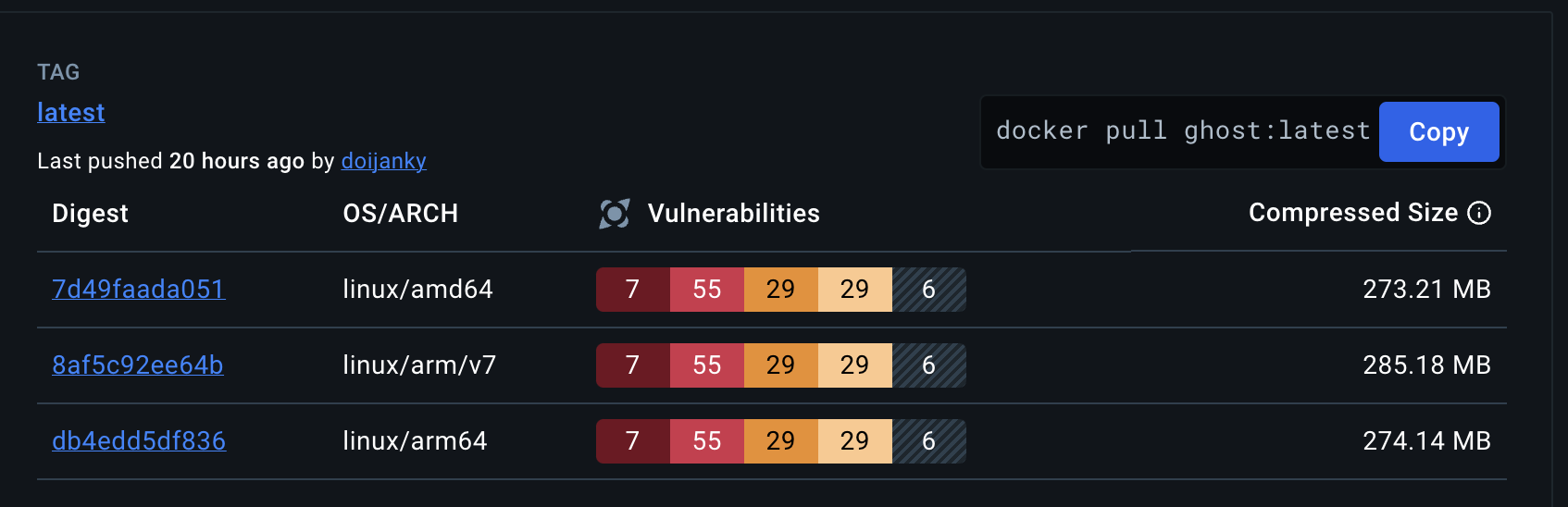 |
Example of our Ghost on Kubernetes Image on Docker Hub: 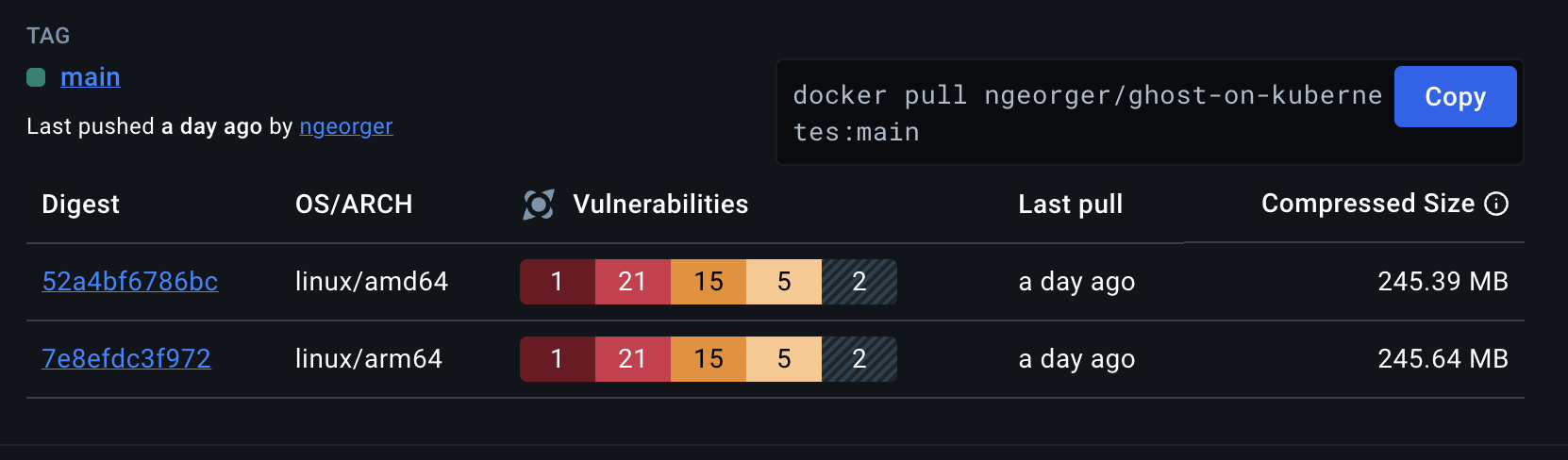 |
- Custom Build Artifacts: We maintain two distinct Dockerfiles for production and development:
- Production Image: The main image built using our hardened, multi-stage build process. See the Dockerfile.
- Development Image: A variant tailored for testing, which bundles SQLite support. See the Dockerfile-dev.
- Multi-Arch Support: Images are built for both amd64 and arm64 architectures.
- Multi-Stage Build: We use the official Node 22 Jod LTS image for building, which significantly reduces the final image size and improves security by removing unnecessary build components.
- Updated Ghost v6 & NodeJS 22 LTS: Using the latest stable versions for security and performance.
- Robust Entrypoint (entrypoint.js): A custom Node.js entrypoint script, executed by the unprivileged user, handles necessary runtime operations like updating default themes before starting the Ghost application. The script can be reviewed here: entrypoint.js.
- Dedicated Init Container: The deployment includes an initContainer to handle directory creation, correct ownership (UID/GID 65532), and permission setting prior to the main Ghost container launch, ensuring seamless operation inside the Distroless container.
This project provides complete Kubernetes manifest files (deploy/) to run a production-ready Ghost instance backed by a MySQL database.
| Resource | Components | Details |
|---|---|---|
| Namespace | ghost-on-kubernetes | Provides logical isolation for all components. (File: 00-namespace.yaml) |
| StatefulSet | ghost-on-kubernetes-mysql | Manages the MySQL 8 database, ensuring stable networking and persistent storage. (File: 05-mysql.yaml) |
| Deployment | ghost-on-kubernetes | Manages the Ghost v6 application pods. (File: 06-ghost-deployment.yaml) |
| Services | ghost-on-kubernetes-service, ghost-on-kubernetes-mysql-service | Exposes Ghost (2368) and MySQL (3306) internally within the cluster. (File: 03-service.yaml) |
| PersistentVolumeClaims (PVC) | k8s-ghost-content, ghost-on-kubernetes-mysql-pvc | Requests persistent storage for Ghost content (themes, images) and MySQL data. (File: 02-pvc.yaml) |
| Secrets | ghost-config-prod, ghost-on-kubernetes-mysql-env, tls-secret | Securely stores Ghost configuration, database credentials, and TLS certificates (optional). (Files: 01-mysql-config.yaml, 04-ghost-config.yaml, 01-tls.yaml) |
| Ingress | ghost-on-kubernetes-ingress | Exposes the Ghost application to the outside world via HTTP/HTTPS (requires a TLD). (File: 07-ingress.yaml) |
Note: You can host multiple Ghost instances by replacing the Namespace specification in each manifest file.
Follow these steps to deploy Ghost on your Kubernetes cluster.
- A functioning Kubernetes cluster (kubectl configured).
- A provisioned StorageClass (required for PVCs).
## Clone the repository
git clone https://github.com/sredevopsorg/ghost-on-kubernetes.git --depth 1 --branch main --single-branch --no-tags
## Change directory
cd ghost-on-kubernetesReview the example configuration files and modify the manifests in the deploy/ folder to suit your environment (e.g., storage class, domain name, secret values).
- Configurations: Check the example configuration files in the examples/ directory:
- config.production.sample.yaml: Recommended configuration using MySQL 8. Requires a valid top-level domain (TLD) for the url field and Ingress configuration.
- config.development.sample.yaml: Uses SQLite for testing environments.
- Official Ghost Docs: Refer to the official Ghost documentation for detailed configuration options.
It is crucial to apply the manifests in the correct order to ensure dependency resolution (especially the database components).
-
Create the Namespace:
kubectl apply -f deploy/00-namespace.yaml
-
Create Secrets (Credentials and Config):
# IMPORTANT: Customize these secrets before applying kubectl apply -f deploy/01-mysql-config.yaml kubectl apply -f deploy/04-ghost-config.yaml kubectl apply -f deploy/01-tls.yaml -
Create Persistent Storage and Services:
kubectl apply -f deploy/02-pvc.yaml
kubectl apply -f deploy/03-service.yaml
-
Deploy MySQL Database (StatefulSet):
# Wait for the MySQL PVC to be bound kubectl apply -f deploy/05-mysql.yaml -
Deploy the Ghost Application (Deployment):
# Wait for MySQL to be ready before starting kubectl apply -f deploy/06-ghost-deployment.yaml -
Expose Ghost with Ingress (Optional/Recommended):
# Routes external traffic to the Ghost Service
kubectl apply -f deploy/07-ingress.yaml
Congratulations! You have deployed a highly secure and scalable Ghost v6 instance on Kubernetes.
To preview the website without configuring Ingress or a TLD, you can use port forwarding:
- Temporarily configure both url and admin URLs in your config.production.json Secret to use
http://localhost:2368/. - Restart the Ghost pod(s) after updating the Secret.
- Run the port-forwarding command:
kubectl port-forward -n ghost-on-kubernetes services ghost-on-kubernetes-service 2368:2368We welcome contributions from the community! Please check the CONTRIBUTING.md file for more information on how to contribute to this project.
- This project is licensed under the MIT License. Please check the LICENSE file for more information.
- The Ghost CMS is licensed under the MIT License.
- The node image and the Distroless image are licensed by their respective owners.