The main goal is to make accumulating results from multiple tests and exercises in arbitrary locations a lot more convenient. These test should be configurable in the test overview object; RBAC should be applied in the usual way, ie. a lecturer can only select his own tests/tests he or she has access to for inclusion in the overview. (The test overview should not be "hierarchical" object that has to "contain" the test it accumulates like a folder or category.)
The overview itself should present a table matrix of users (rows), test/exercise (end) results (percentages; columns) and a final mean value column. The matrix fields should have different background colors for passed (green), not passed (red). It remains white if no grade is given. TestOverview also presents a graphic view of the test and exercise results in form of column diagram. For exporting the results into another program TestOverview is able to generate a comma-separated values file which covers all results from added tests and exercises.
-
Clone this repository to <ILIAS_DIRECTORY>/Customizing/global/plugins/Services/Repository/RepositoryObject/TestOverview
1.1 Go to ilias root directory:
1.2 mkdir -p Customizing/global/plugins/Services/Repository/RepositoryObject/ 1.3 cd Customizing/global/plugins/Services/Repository/RepositoryObject/ 1.4 git clone https://github.com/Ilias-fmi/TestOverview.git -
Login to ILIAS with an administrator account (e.g. root)
-
Select Plugins from the Administration main menu drop down.
-
Search the TestOverview plugin in the list of plugin and choose Update and Activate from the Actions drop down.
This manual shows the main functions of the plugin and explains how to use them.
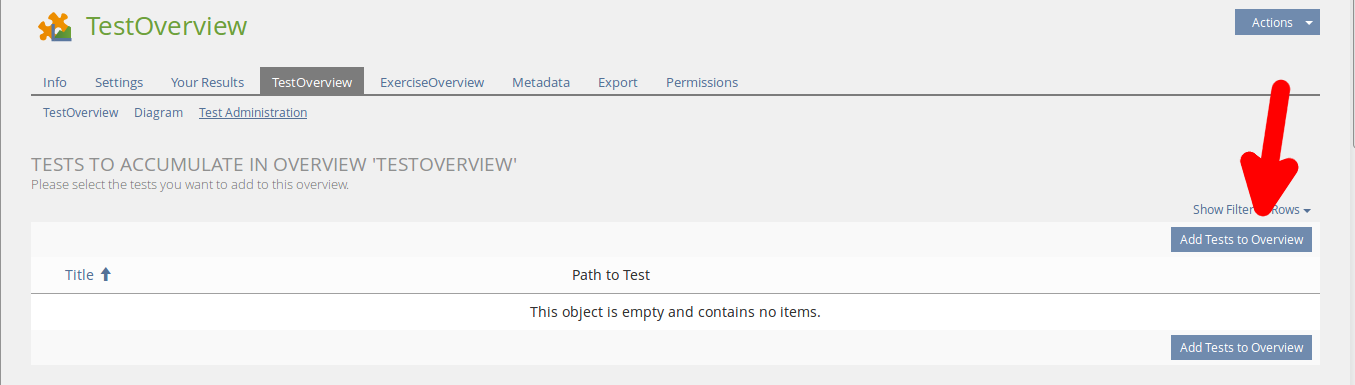
Go to the tab Test Administration and click on Add tests to Overview
Select your tests and click Select

The results are now visible in the subtab TestOverview.

With TestOverview it's possible to create diagrams of the average results. For a test-diagram go to the subtab Diagram in the tab TestOverview.

For an exercise-diagram you have to enter a granularity. If the granularity is too small the diagramm is set to 100 buckets as a maximum size. Click on Make my Diagram to render it.

The export window of TestOverview looks like this.
 It provides two generic ways to export the results of added tests and exercises; reduced and extended.
The first entries of the resulting comma-seperated values file contain in each case the names of the students (lastname, firstname), their matriculation number (this is a field especially for the usage at University of Stuttgart), the groups they are members in (in the course the TestOverview object lies in), their email-address and gender.
The first case, the Reduced Format lets the user export the final test- and exercise results of all users that participated in the added tests and exercises.
The second case, the Extended Format additionally exports the results for all subquestions from tests and assignments from exercises.
Course administators maybe need the right to Create a new TestOverview Object.
Repository>>Course>>Permissions->Create new Objects->TestOverview.
 To use the full range of functions, you need to make sure to manage the permissions for the users.
People that should be able to see the course results should be granted Write Permissions.
To use the full range of functions, you need to make sure to manage the permissions for the users.
People that should be able to see the course results should be granted Write Permissions.
The people that should only have insights in their own summarized results should be granted Read Permissions.
This can be done in the TestOverview Object under Permissions>>Course Administrator/Member/Tutor

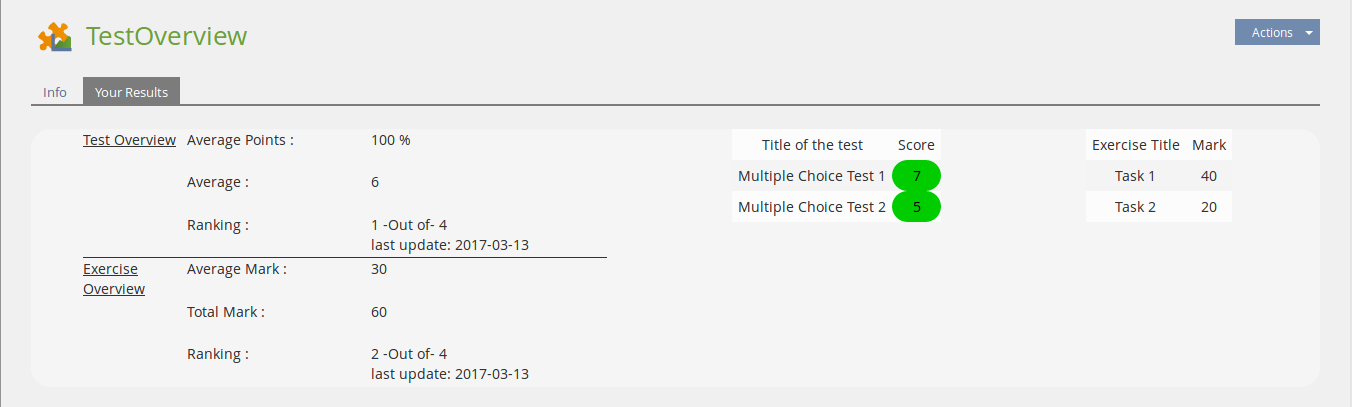
The user panel is for students to lookup their results. The window shows total and average results of tests and exercises and the total rank of the student. It also gives a list of every test and exercise and the related result. By marking the results with color it shows if the exercise/test is passed or failed (green = passed / red = failed).